The most advanced platform is not automatically the best one. A store with a ten-step, event-driven lifecycle program and a newsletter writer who needs a welcome email have very little in common, and the same email automation software will not serve both well.
Three variables do most of the work in this decision: how complex your automations need to be, what triggers them, and what kind of business you run. This guide uses those three variables, which we call the Automation Fit Framework, to match seven tools to the situations where they make sense. It also says where each one is the wrong call.
Quick Answer: Which Email Automation Tool Fits You?
These are starting points, not verdicts. The sections below explain the reasoning and the exceptions.
- Simple sequences and beginners: MailerLite fits welcome series, lead magnet delivery, and basic drips.
- Value plus multichannel: Brevo suits buyers who want email alongside SMS or other channels without a premium-stack budget.
- Advanced branching and lifecycle logic: ActiveCampaign suits teams whose customer behavior genuinely changes the next step.
- Ecommerce, deeper data and segmentation: Klaviyo is built around store events and revenue-focused flows.
- Ecommerce, simpler needs: Omnisend offers practical lifecycle automation with less emphasis on the deepest branching and data-model flexibility.
- Product or app events: Customer.io suits companies that already have meaningful event data.
- CRM and sales workflows: HubSpot suits teams whose email automation has to work alongside pipeline and sales activity.
If you mainly publish a newsletter, you may not need automation software at all. See our guide to Best Newsletter Platforms in 2026.
How Much Email Automation Do You Actually Need?
Most buying mistakes come from misjudging this one question. Classify your own workflows first, then look at tools.
Basic automation
Basic automation follows a fixed path with little decision-making.
- A welcome series that sends after signup
- Delivery of a lead magnet, followed by a short nurture sequence
- A simple drip sequence over a set number of days
- A straightforward follow-up after a form submission
The trigger is usually time-based or a single subscriber action. If everything you plan to build looks like this, the extra power in advanced platforms mostly adds setup work and cost.
Intermediate automation
Intermediate automation starts reacting to what people do.
- Behavior-based triggers, such as a link click or page visit
- Segmentation, so different audiences receive different messages
- Conditional paths, where one outcome sends a subscriber down one route and another outcome down a second
- Ecommerce lifecycle flows, such as abandoned cart or post-purchase follow-ups
This is where tool differences begin to matter. Trigger options, segmentation depth, and how conditions are built vary between platforms, and they affect how much you can do without workarounds.
Advanced automation
Advanced automation treats the journey as a system rather than a sequence.
- Multi-branch journeys with several decision points
- Custom events sent from your own product or app
- CRM logic that responds to deal stage or sales activity
- Complex lifecycle programs spanning onboarding, activation, retention, and win-back
- Multi-step customer journeys that combine several of these inputs
Here the question is not only what the tool can do but what your team can maintain. A powerful workflow builder only pays off if someone keeps the logic and the data behind it in good shape.
Where do you land?
| If your automations look like… | You are probably at… | Likely direction |
|---|---|---|
| Welcome email plus a few follow-ups | Basic | Simpler tools |
| Behavior triggers, segments, store events | Intermediate | Mid-range or ecommerce-specific tools |
| Custom events, CRM logic, multi-branch journeys | Advanced | Specialist or enterprise-style tools |
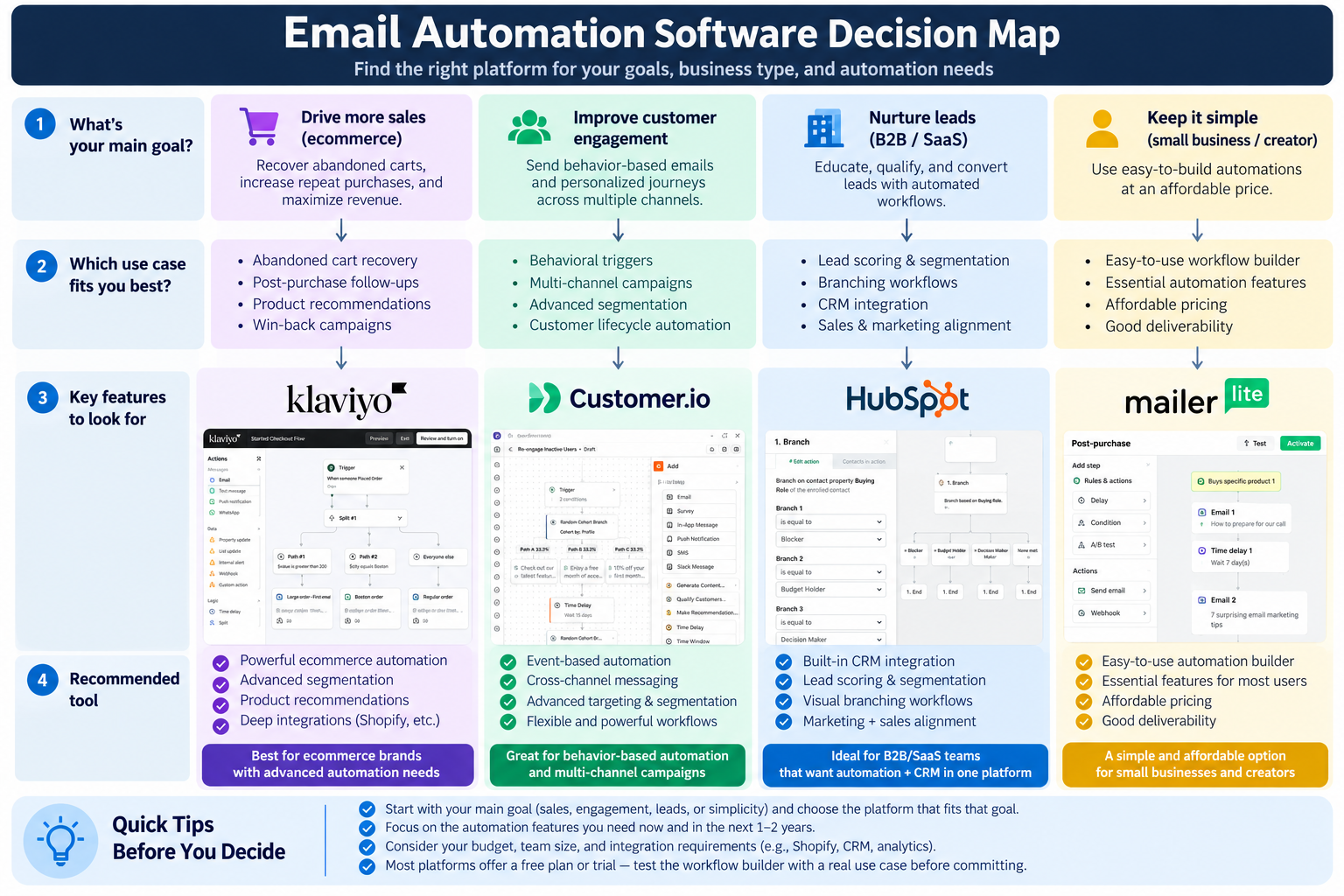
The decision map above combines complexity, trigger model, and business context so you can see how changing one variable changes the shortlist. A store with intermediate needs points somewhere different from a SaaS team with the same level of complexity, because the triggers come from different places.
If you are not sure what "advanced" looks like in a real builder, the video below walks through ActiveCampaign's automation interface. It shows how branches, conditions, and actions are laid out visually. You do not need to choose ActiveCampaign to find it useful, since it is a concrete reference point for judging whether your own workflows would ever need that structure.
If the workflow in the demo looks far beyond anything you would build, that is useful information. It suggests the simpler options later in this guide are the better fit.
Email Automation Software Comparison
Use this as a summary. The reasoning sits in the product sections that follow.
| Tool | Best For | Automation Depth | Trigger Strength | Main Trade-off |
|---|---|---|---|---|
| ActiveCampaign | Advanced lifecycle logic | High | Behavior and CRM-style | Power vs complexity |
| Klaviyo | Ecommerce-led brands | High (ecommerce) | Store events | Cost growth with profiles |
| Omnisend | Simpler ecommerce, multichannel | Medium | Store events | Ease vs depth |
| Customer.io | SaaS and product events | High (event-driven) | App and product events | Needs data maturity |
| HubSpot | CRM-led teams | High (platform-wide) | CRM and sales events | Cost and breadth |
| MailerLite | Beginners, simple flows | Basic to medium | Subscriber actions | Ease vs depth |
| Brevo | Value, multichannel | Medium | Contact and channel actions | Breadth vs depth |
Best Email Automation Software by Workflow
These sections are grouped by the situation each tool serves, not ranked. The order is a reading order only.
ActiveCampaign: when customer behavior changes the next step
Official facts. ActiveCampaign supports branching and conditional workflows built from triggers, conditions, and actions. automation triggers actions and If/Else branches Which of these features you get may depend on your plan. plan availability
Public user feedback. A recurring theme in public reviews is a learning curve. Some users report that the platform takes time to configure well and that its depth can feel like overhead when needs are modest. a sample of G2 reviews These are reported experiences, not a property of the product that applies to every team.
Editorial interpretation. That flexibility matters when customer behavior genuinely changes what should happen next. Lead nurturing is the clearest case, where engagement decides whether someone gets more content, a sales handoff, or a pause. If you can name two or three journeys that branch on behavior, the overhead is likely worth it. If your automation is a welcome series and a few linear follow-ups, a simpler tool will probably get you live faster.
Skip it if you only need simple welcome flows and linear follow-ups.
Klaviyo: when the store is the source of truth
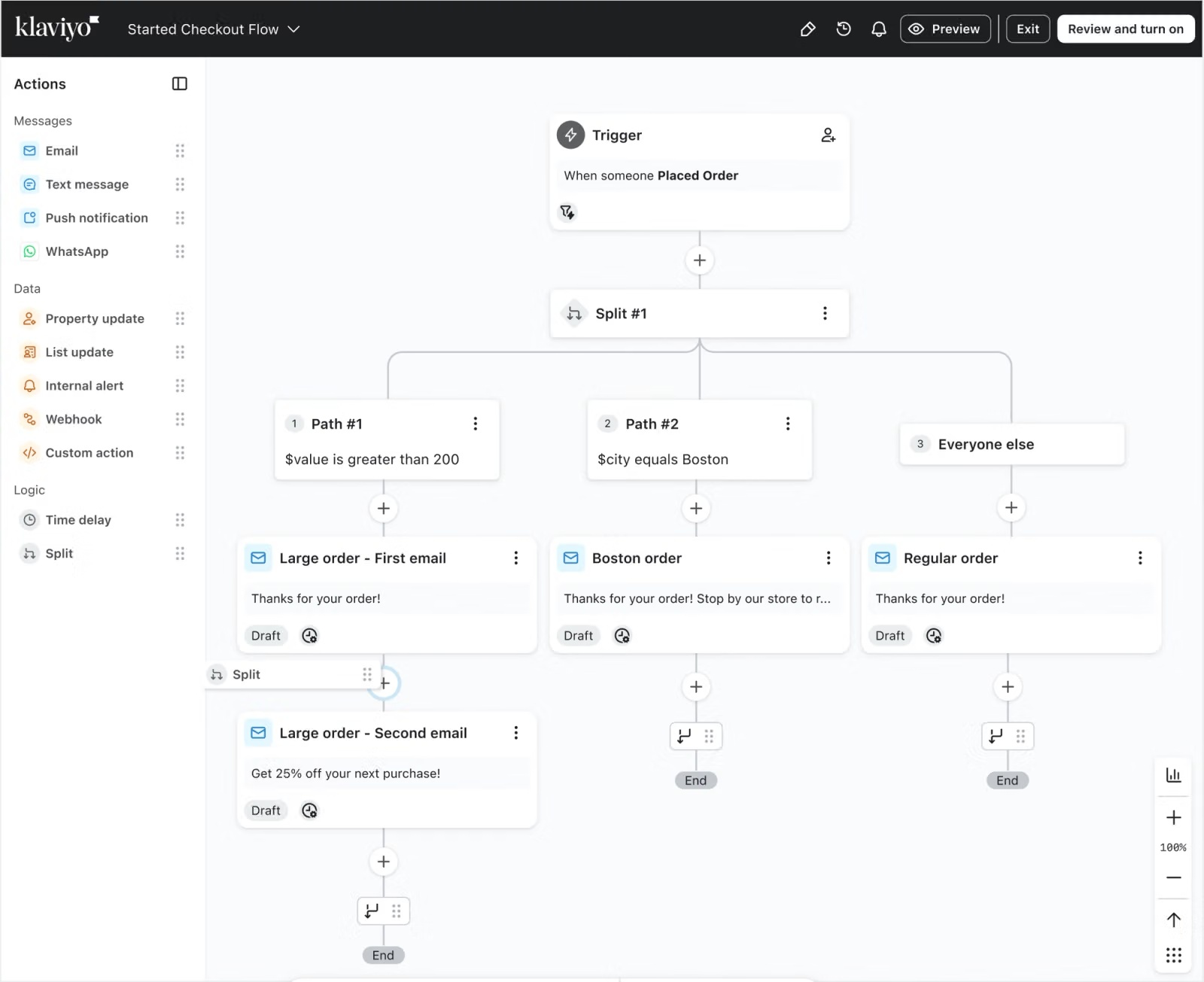
Official facts. Klaviyo flows can be triggered by ecommerce and customer behavior, and its segmentation and flow conditions can draw on that activity. configurable flow triggers and filters that activity Its pricing is tied to profiles. active profiles
Public user feedback. Some merchants report rising cost pressure as their profile counts grow. G2 pricing reviews This is a pattern in reported experiences, not a universal verdict on the product's price.
Editorial interpretation. The ecommerce depth is the reason to choose Klaviyo, and it may justify the cost only when the store actually uses those capabilities. A store running revenue-focused lifecycle flows built on browse, cart, and purchase behavior is in a different position from one that sends abandoned-cart and post-purchase emails and little else. The first may see the value. The second may be paying for depth it does not use.
Skip it if you are not an ecommerce business, or your needs are basic enough that a lighter tool covers them. For wider context, see our comparison of Best Email Marketing Software for Ecommerce in 2026.
Omnisend: practical ecommerce flows across channels
Official facts. Omnisend offers ecommerce-triggered workflows and multichannel messaging. ecommerce-triggered workflows What is included may vary by plan. plan and channel availability
Public user feedback. Some public reviews describe the platform as approachable. G2 review summaries That is a reported impression, not a product claim.
Editorial interpretation. Omnisend suits ecommerce brands that want practical lifecycle automation, such as welcome, cart recovery, and post-purchase flows, across email and other channels. It puts less emphasis on the deepest branching and data-model flexibility, and for many small and mid-sized stores that is a reasonable exchange. Simpler flows that run reliably can be worth more than customization the team never builds.
Skip it if you expect very complex branching or an advanced data model. In that case, compare it with Klaviyo and ActiveCampaign.
Customer.io: when product behavior drives the message
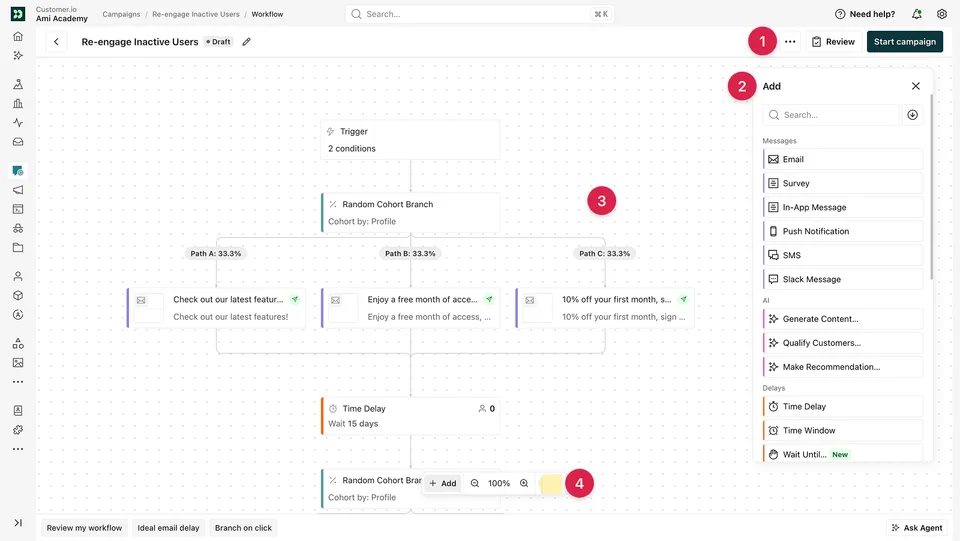
Official facts. Customer.io is built around event-driven workflows. Messages can be triggered by event data sent from your product or app and routed through journey logic. event-driven workflow documentation Its pricing follows its own model. its pricing
Public user feedback. Some users report that implementation and data setup take significant effort. G2 user feedback As with any user feedback, this reflects those teams' circumstances and not every implementation.
Editorial interpretation. This tool fits companies that already have meaningful product data and want to message based on activation milestones, feature usage, or lapses in engagement. Event flexibility is only an advantage when you have events worth using. Without event data and the data maturity to keep it clean, the flexibility turns into unused complexity.
Skip it if you run a simple newsletter, or your team has no meaningful event data to work with. The tool will not make up for that gap.
HubSpot: when email is one part of a larger system
Official facts. HubSpot workflows can enroll contacts based on triggers and split them with If/Then branches, and availability depends on the plan. workflow enrollment triggers workflow and branch availability Pricing for Marketing Hub varies by tier. Marketing Hub pricing
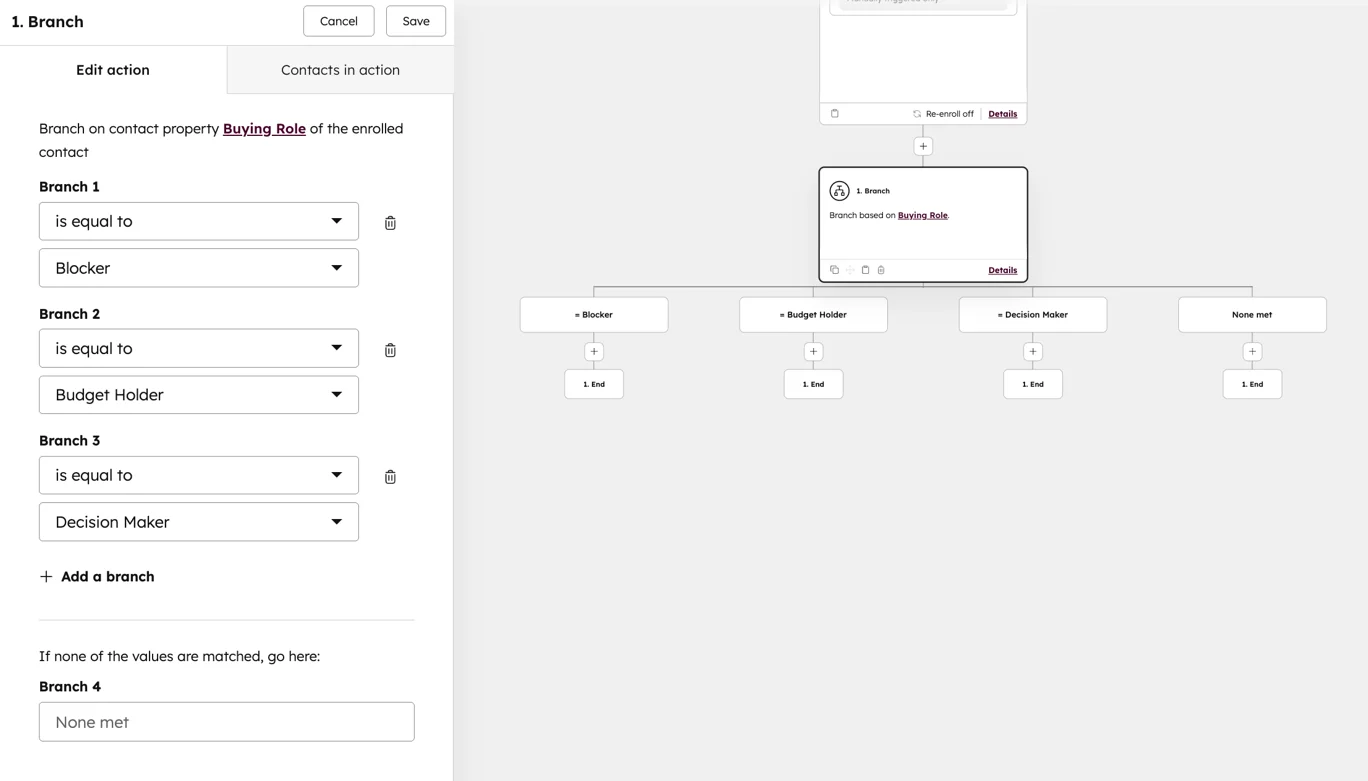
Public user feedback. Public discussions suggest that some users raise cost and workflow maintenance as concerns, along with the sense of paying for a larger platform than they use. G2 pricing and review feedback These are reported experiences from some users, not a universal judgment.
Editorial interpretation. HubSpot makes sense when email automation needs to operate alongside CRM data, pipeline stages, and sales follow-up. A workflow can respond to what is happening in the CRM and not only to email activity, and for sales-led teams that integration is the point. If you mainly need email automation, HubSpot may be a major overbuy.
Skip it if email automation is your main requirement, or you have no use for the CRM side.
MailerLite: simple automation, with one limit to know
Official facts. MailerLite supports automation triggers, but multiple triggers are available only on the relevant higher plan, and an automation can use up to three triggers. automation trigger and multiple-trigger limits
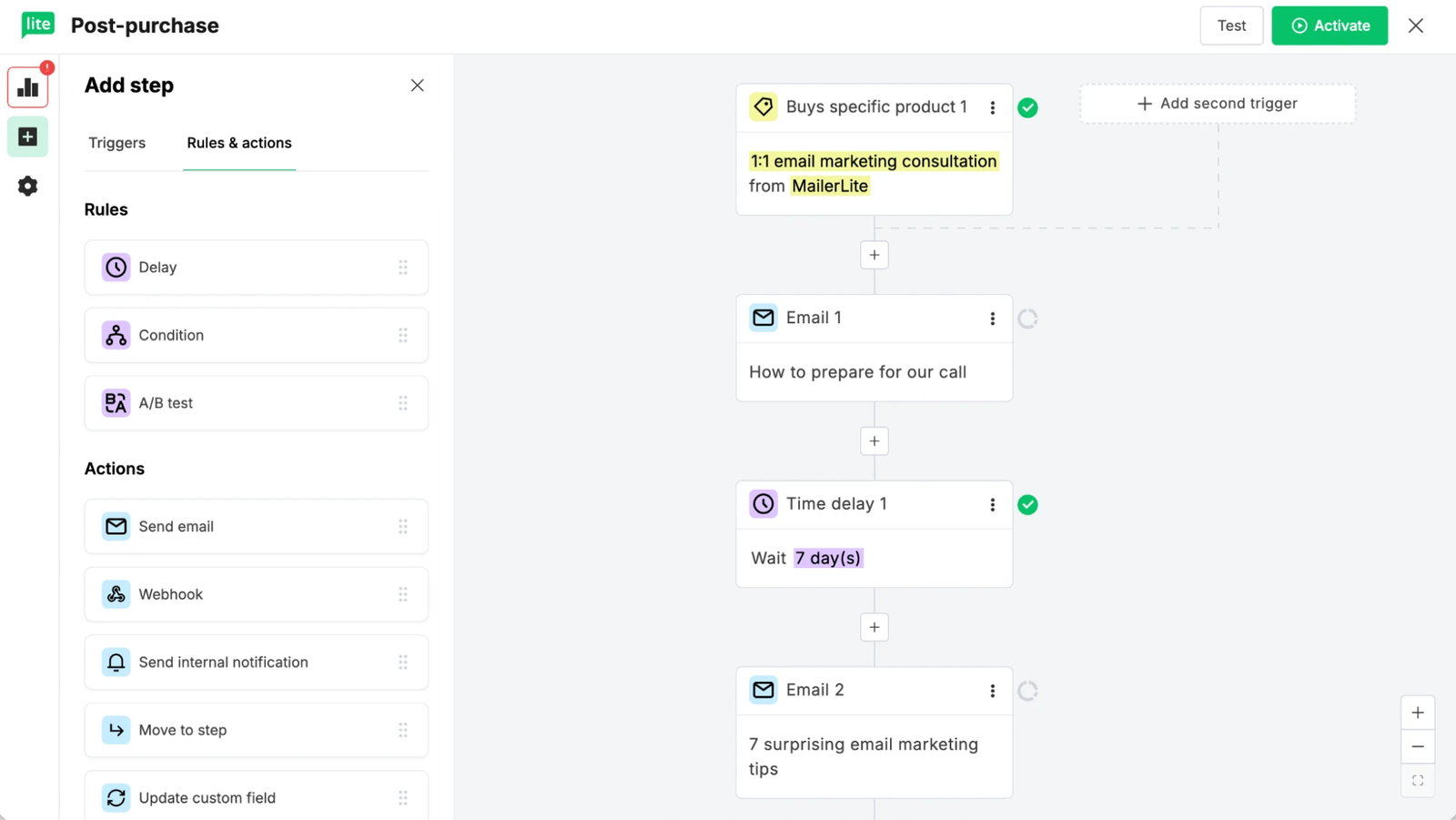
Editorial interpretation. That detail shapes how far MailerLite stretches. Combining up to three triggers lets it cover some lower-intermediate automation, such as entering the same journey from a signup, a group, or another subscriber action. Because multiple triggers sit on a higher plan and are capped, MailerLite should not be treated as unrestricted advanced automation. For welcome sequences, simple drips, and basic subscriber journeys, the simplicity is a benefit. If your workflows stay in the basic to lower-intermediate range, it is a sensible default.
Skip it if you expect advanced automation needs, since teams with complex requirements may hit limits sooner. If you are moving from a general-purpose tool, see Mailchimp Alternatives.
Brevo: breadth and value across channels
Official facts. Brevo offers multiple automation triggers and supports multichannel messaging. automation triggers, actions, and messaging channels Plan differences and automation contact limits may affect what you can run. automation contact quotas by plan
Editorial interpretation. Brevo suits buyers who want email automation alongside SMS or other channels without jumping into a premium stack. The appeal is range and price rather than depth in any one area. It should not be treated as equivalent to ActiveCampaign or Customer.io for deep data models and highly complex, behavior-driven journeys.
Skip it if your automations depend on complex data logic or product events.
Which Type of Email Automation Software Should You Choose?
| If this describes you… | Consider | The trade-off |
|---|---|---|
| You only need simple sequences | MailerLite | Ease and value, less depth |
| You want value plus multichannel | Brevo | Breadth over advanced depth |
| You need advanced branching | ActiveCampaign | Power over simplicity |
| Ecommerce drives your lifecycle | Klaviyo or Omnisend | Depth and cost vs ease and value |
| Product or app events drive messaging | Customer.io | Event flexibility vs implementation burden |
| CRM and sales workflows are central | HubSpot | Unified platform vs cost and breadth |
These pairings are not fixed. If your automation complexity, trigger model, or business context changes, the right product can change with it. A store that grows from basic flows into deeper segmentation, or a newsletter that adds a sales motion, may need a different tool than the one that fit at the start.
A few pairs are worth a closer look.
MailerLite vs Brevo. Both can handle simple automation. Choose MailerLite if simplicity is the priority, and Brevo if multichannel messaging matters.
Klaviyo vs Omnisend. Klaviyo suits stores that need deeper segmentation and event logic. Omnisend suits stores that want practical flows without that depth. Choose based on the complexity you will actually use, not the complexity available.
ActiveCampaign vs HubSpot. Both support advanced logic. ActiveCampaign suits teams focused on automation itself, while HubSpot suits teams that need CRM and sales workflows in the same system.
ActiveCampaign vs Customer.io. The difference is the trigger source. Customer.io is for product and app events. ActiveCampaign is for behavioral and lifecycle logic that does not depend on that kind of data.
What Actually Matters When Comparing Email Automation Platforms?
Skip the generic feature checklist. These criteria change the decision.
- Workflow depth. Can the tool express the journeys you actually have, not just the ones in the demo?
- Trigger flexibility. Does it support the trigger types your business generates: time-based, subscriber actions, ecommerce events, product events, or CRM events?
- Branching logic. Do you need conditional paths? If so, how easily can you build and read them later?
- Data model. Can the tool hold the data your workflows depend on, and who keeps that data clean?
- Ecommerce, CRM, and event integration. Is the integration with your store, CRM, or product native or built by hand?
- Setup burden. How long until the first useful workflow is live, and who does the work?
- Pricing model. Contact-based, profile-based, and send-based pricing grow differently. Model the cost at your list size in a year, not today.
- Plan gating. Some automation features may sit on higher tiers, so check the plan that includes what you need.
- Maintenance burden. Complex workflows need ongoing attention. Consider who will own them in six months.
Final Decision
There is no single best email automation software, and the right choice depends on the answer to one question: how much automation do you actually need?
Simpler can be smarter. If your workflows are a welcome series and a few follow-ups, a lighter tool will get you live faster and cost less. Advanced platforms make sense only when advanced workflows will be built and used: behavior-driven branching, store or product events, or CRM-linked journeys.
Start by listing the three to five automations you would build in the first 90 days. Classify them as basic, intermediate, or advanced, identify what triggers each one, and match them to the business context that fits you. Then choose the tool that handles that list without leaving you paying for, or maintaining, more than you need.